
Embark on a journey into the world of virtual room designers, where creativity meets functionality to bring your design visions to life. From selecting color palettes to arranging furniture, virtual room designers offer endless possibilities for home improvement enthusiasts. Let's delve into the details of this innovative tool and discover how it can revolutionize your design projects.
Introduction to Virtual Room Designers
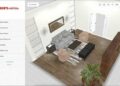
Virtual room designers are online tools or software that allow users to create and visualize interior design concepts for their homes or spaces. These tools provide a virtual platform for users to experiment with different layouts, furniture arrangements, color schemes, and decor options.
How Virtual Room Designers Work
Virtual room designers typically start by allowing users to input the dimensions of their space or select from pre-defined room templates. Users can then add furniture, decor items, and other design elements to create a virtual representation of their room.
Some tools also offer features like 3D modeling, augmented reality, and virtual reality to provide a more realistic and immersive design experience.
Benefits of Using Virtual Room Designers
- Cost-effective: Virtual room designers eliminate the need to hire a professional designer, saving money on design fees.
- Convenience: Users can design and visualize their space from the comfort of their own home, at any time.
- Time-saving: Virtual room designers allow users to quickly experiment with different design ideas and layouts without the need for physical rearrangement.
- Decision-making: Users can make informed decisions about furniture purchases and design choices by seeing how everything will look together in the virtual space.
Features of Virtual Room Designers
Virtual room designers offer a range of features to help users visualize and plan their living spaces effectively. These features are designed to make the process of interior design more convenient and efficient.
Key Features:
- 3D Visualization: Virtual room designers allow users to view their designs in 3D, providing a more realistic representation of the space.
- Furniture Placement: Users can easily place and rearrange furniture in the virtual room to find the best layout.
- Color Schemes: Users can experiment with different color combinations to find the perfect palette for their room.
- Material Selection: Virtual room designers often include a variety of materials for users to choose from when designing their space.
- Lighting Options: Users can adjust lighting settings to see how different lighting conditions affect the room's appearance.
Customization Options:
Virtual room designers typically offer a wide range of customization options to cater to the user's specific needs and preferences. These options may include the ability to change wall colors, flooring materials, furniture styles, and more. By allowing users to customize every aspect of the room design, virtual room designers ensure that the final result reflects the user's unique style and taste.
Importance of Accurate Measurements and Scale:
Accurate measurements and scale are crucial in virtual room designing to ensure that the design is realistic and functional. Virtual room designers often provide tools for users to input room dimensions and scale models accurately. This helps users visualize how different furniture pieces and design elements will fit into the space, preventing costly mistakes in the real-world implementation of the design.
How to Use a Virtual Room Designer
To start using a virtual room designer, follow these steps to create your dream space:
Step 1: Choose a Room Layout
Start by selecting the type of room you want to design, whether it's a bedroom, living room, kitchen, or any other space. This will serve as the foundation for your design.
Step 2: Add Walls and Doors
After choosing the room layout, add walls and doors to Artikel the structure of the space. This will help you visualize how furniture and other elements will fit within the room.
Step 3: Select Furniture and Decor
Once the basic layout is set, start adding furniture pieces and decor items to the room. Choose from a variety of options available in the virtual room designer's library to customize the look and feel of your space
Step 4: Experiment with Colors and Textures
Play around with different colors and textures to see how they complement the furniture and decor in your virtual room. This step will help you decide on the perfect color scheme and materials for your design.
Step 5: Fine-Tune the Details
Lastly, fine-tune the details of your design by adjusting the placement of furniture, decor items, colors, and textures. Take your time to explore different options until you're satisfied with the overall look of the room.By following these steps and experimenting with the features of a virtual room designer, you can create a visually appealing and well-planned space that suits your style and preferences.
Comparing Popular Virtual Room Designers
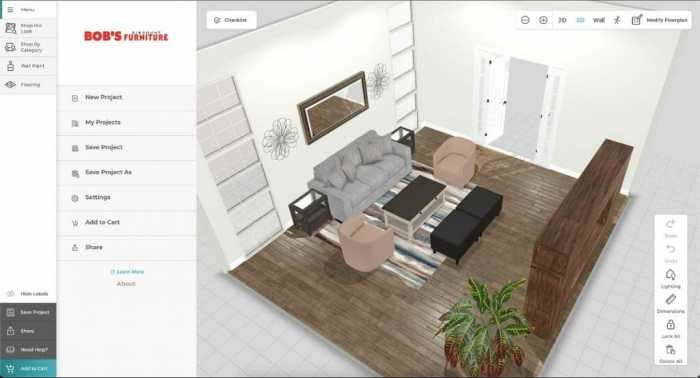
When it comes to virtual room designers, there are several options available in the market, each with its own unique features and user experiences. Let's take a closer look at some of the most popular virtual room designers and compare them to help you make an informed decision.
IKEA Home Planner
The IKEA Home Planner is a popular virtual room designer that allows users to design their spaces using IKEA furniture and accessories. One of the standout features of this tool is its extensive catalog of IKEA products, making it easy for users to visualize their designs with real products.
User reviews praise the user-friendly interface and the ability to create detailed floor plans.
Roomstyler
Roomstyler is another well-known virtual room designer that offers a wide range of customization options for designing rooms. Users can choose from a variety of furniture and decor items to create their ideal space. One unique feature of Roomstyler is its 3D rendering capabilities, allowing users to view their designs from different angles.
Reviews highlight the realistic graphics and intuitive design tools.
Houzz Virtual Rooms
Houzz Virtual Rooms is a popular choice for those looking to design their spaces with a curated selection of furniture and decor items. This virtual room designer stands out for its collaboration features, allowing users to share their designs with others for feedback.
Users appreciate the inspiration galleries and the ability to shop directly from the platform.
Planner 5D
Planner 5D is a versatile virtual room designer that offers both 2D and 3D design capabilities. Users can create detailed floor plans and visualize their designs in realistic 3D renderings. One of the standout features of Planner 5D is its integration with VR headsets, allowing users to experience their designs in virtual reality.
Reviews commend the easy-to-use interface and the vast library of design elements.
Last Point
In conclusion, virtual room designers serve as invaluable resources for anyone looking to transform their living spaces with ease and precision. By utilizing these tools, you can unleash your creativity, explore different design options, and create a personalized haven that reflects your unique style.
Embrace the power of virtual room designers and take the first step towards crafting the home of your dreams.
Essential Questionnaire
How do virtual room designers work?
Virtual room designers use advanced software to create digital replicas of rooms where users can experiment with different design elements.
What are the benefits of using virtual room designers?
Virtual room designers help in visualizing design ideas, making accurate measurements, and trying out various layouts before committing to any changes.
Can virtual room designers provide accurate measurements?
Yes, virtual room designers are equipped with tools that allow users to input precise measurements for accurate design planning.